
Host the game. We'll run the admin.
Set the sport, spot, and time once — then let thump! handle approvals, waitlists, reminders, and post-game confirmation. No spreadsheet, no group chat, no chasing RSVPs.
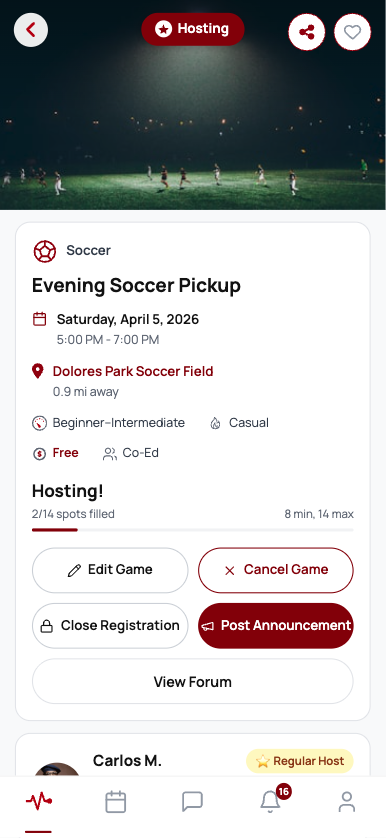
Set up a run in under a minute.
Six quick steps and your game is live in the Discover feed. Edit any of it later — every section reopens with your details prefilled.
Pick the sport and set a minimum and maximum — or a single target number.
Casual to competitive, open to all or gender-specific, so the right players self-select.
Drop a map pin and add a detail like "Court 3 near the fountain" so nobody wanders.
Set start and end. The end time is when your post-game rating window opens.
Choose who can join and whether it's free or paid — covered below.
Add a short description and tap suggestion chips like "Beginners welcome."
You decide who's on the roster.
Three access modes, so a casual open run and an invite-only league night both work exactly the way you want.
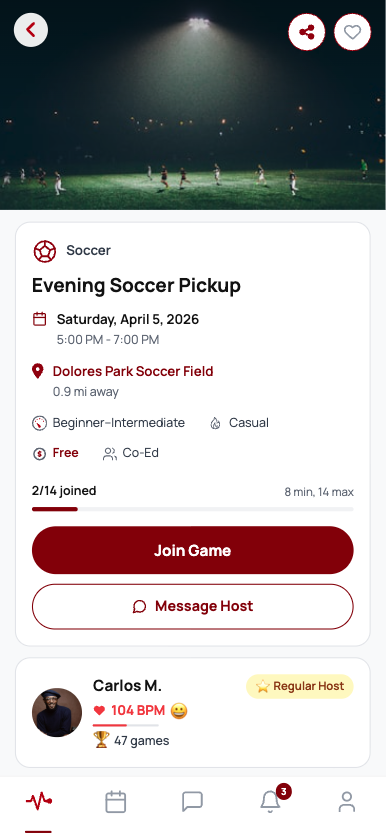
Public join
Anyone can claim a spot instantly, up to your max. Best for filling fast and growing a regular crew.
Lobby review
Players request to join and you accept or decline from your lobby. Declined players get no penalty — and you stay in control of the roster.
Invite-only code
Share a 4-digit code with your invitees. The game never appears in the public feed — only people with the code can join.
The roster runs itself.
Approve the right players, and let thump! quietly keep your game full right up to start.
- Lobby approvals
Accept or decline join requests with a tap. Declined and withdrawn requests carry no penalty for the player.
- Automatic waitlist
When you're full, latecomers land on the waitlist. The next eligible person is promoted the instant a seat opens — respecting how much notice they need.
- Open and close at will
Close registration to lock the roster, or reopen it anytime. Closed games stay hidden from everyone not already in.
The reminders you'd rather not send.
thump! nudges everyone at the right moments and walks the game through to a clean finish — automatically.
Smart reminders
A private heads-up 48 hours out if your game is under-filled, then automatic reminders to everyone 24 hours and 4 hours before start.
Post-game confirmation
After the game, you and your players confirm it took place. Once enough agree, the run is marked complete and ratings apply.
Teams when you need them
Within 24 hours of start, publish a roster of 2 to 8 teams. Everyone confirmed sees the lineup the moment you post it.
Run it your way.
Most games are free. If yours has a court fee, you stay in charge of the money.
Free games
The default. No payment surface at all — just set the game and fill it. Perfect for the runs that keep a community going.
Paid externally
Got a court fee? List the price so players know what to expect, and collect it your way — cash, Venmo, whatever you already use.thump! shows the price; the payment stays between you and your players.
In-app payments are on the roadmap, not in your hands yet — we'll tell you the moment they're ready.
Good hosts get rewarded.
Run your games well and your reputation climbs — the same quiet trust signal players earn. Cancel because you couldn't fill? That's never held against you.
Set the game. We'll handle the rest.
Host your first run on thump! — free on iOS and Android.